
#1 Ultimate Pag-IBIG MDF Form Online Registration Philippines 2026 (Easy Step-by-Step Guide)
Executing your Pag-IBIG MDF Form Online Registration Philippines 2026 properly is one of the most critical steps you must take before starting a new job. Landing a new job is a massive milestone, but the grueling corporate onboarding process that immediately follows can quickly drain your enthusiasm. Among the towering stack of pre-employment requirements your HR department demands, one specific document stands out as a source of massive confusion for fresh graduates, transitioning professionals, and freelancers alike: the Member’s Data Form.
Under Republic Act No. 9679, universally known as the Home Development Mutual Fund (HDMF) Law of 2009, every formally employed Filipino, Overseas Filipino Worker (OFW), and self-employed professional is legally mandated to contribute to the national savings program. However, your employer cannot legally remit your monthly contributions if you do not hand over a physical copy of your printed pag ibig mdf form on your first day of work. This document is the ultimate proof that your identity exists in the government’s master database.
Decades ago, securing this pag ibig mdf meant traveling to a regional branch, falling in line for hours under the heat, and filling out paperwork by hand. Today, the entire system is digitized. Yet, this digital shift brings its own set of terrifying administrative problems. What is the difference between an RTN and an MID? What happens if you accidentally close your browser window before clicking the print button? Navigating the Pag-IBIG MDF Form Online Registration Philippines 2026 portal without clear guidance often leads to duplicate accounts—a massive issue that can permanently freeze your future housing loan applications.
As your definitive authority on Philippine government transactions, REQUIREMENTS PH has built this foolproof, comprehensive masterclass. We will break down the exact Pag-IBIG MDF Form Online Registration Philippines 2026 process, guide you through the official e-services portal, explain how to recover lost numbers, and ensure your HR department accepts your documents without a single delay.
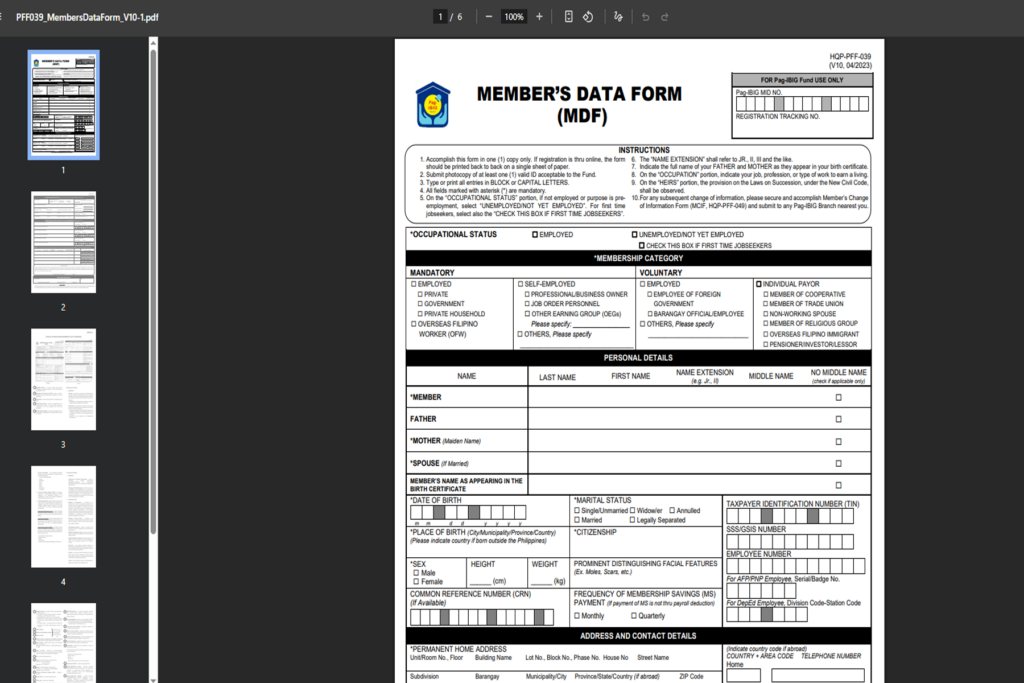
What Exactly is the Member’s Data Form (MDF)?
The Member’s Data Form (MDF) is a formalized, system-generated document provided by the HDMF portal. It contains your complete demographic profile, including your full name, date of birth, mother’s maiden name, current address, and civil status. More importantly, it features a highly secure barcode and your newly assigned permanent registration numbers.
Your company’s HR and Payroll department requires the exact printout of your Pag-IBIG MDF Form Online Registration Philippines 2026 for two critical reasons:
- Identity Cross-Matching: They need to verify that your Pag-IBIG registration details perfectly match the baseline identity on your psa birth certificate.
- Payroll Integration: They must input your exact tracking numbers into their corporate payroll software so your monthly salary deductions are successfully remitted to your specific government account, rather than floating in the system.
RTN vs. MID: Crucial Nuances of the Pag-IBIG MDF Form Online Registration Philippines 2026
Before you begin clicking through the portal, you must absolutely understand the two distinct numbers the system will generate for you. Thousands of applicants submit the wrong number to their employers, causing their monthly contributions to become uncredited.
1. The Registration Tracking Number (RTN)
The moment you successfully complete your Pag-IBIG MDF Form Online Registration Philippines 2026 and click “Submit,” the system will immediately generate a 12-digit Registration Tracking Number (RTN). Think of the RTN as your temporary digital receipt. It proves that your application is currently being reviewed by the Pag-IBIG backend database. Can you use the RTN for your new job? Yes. Most HR departments will temporarily accept the RTN printed on your MDF to process your initial payroll deductions while you wait for your permanent number to be activated.
2. The Pag-IBIG Member ID (MID) Number
This is your permanent, lifetime account number. It is also 12 digits long. Once Pag-IBIG manually verifies that you do not have any duplicate records in their national system, they will automatically convert your temporary RTN into your permanent MID. This backend verification process usually takes 2 to 3 working days. Once you receive your MID via SMS text message, you must immediately give it to your HR department so they can permanently update your 201 Employee File.
Mandatory vs. Voluntary: Who Needs the Pag-IBIG MDF Form Online Registration Philippines 2026?
The system caters to different types of workers in the economy. When filling out the digital pag ibig mdf form, you must select the correct membership category to ensure your minimum contribution rates are calculated accurately.
- Mandatory Members: All private employees (who are concurrently covered by SSS), all government employees (covered by GSIS), uniformed personnel (AFP, PNP, BFP), and all legally deployed Overseas Filipino Workers (OFWs).
- Voluntary Members: If you are a freelancer, an independent contractor, a small online business owner, or even a non-working spouse, you can undergo the Pag-IBIG MDF Form Online Registration Philippines 2026 as a Voluntary Member. This allows you to build your savings, gain access to the highly lucrative MP2 Dividend program, and apply for future housing loans.
Documentary Prerequisites for Your Pag-IBIG MDF Form Online Registration Philippines 2026
The online registration is 100% free of charge. You do not need to scan or upload any physical documents into the portal during the initial phase, but you must have the following information prepared beside your computer to ensure your data perfectly matches the national civil registry.
- Your Original PSA Birth Certificate: You must copy your exact name, spelling, and birth details exactly as they appear on the security paper of your psa birth certificate philippines copy. Even a missing middle initial or an inverted “Jr.” suffix can cause your application to be heavily delayed. If you do not have a physical copy, you can request a psa birth certificate online (or online psa birth certificate) through official portals. Having a clear birth certificate online order ensures your data is accurate. When processing a birth certificate, birth certificate details must exactly mirror what you type into the Pag-IBIG portal.
- Primary Identification: While not uploaded, you must type your name based on your primary government id. The most recommended ID is the philippine national identity card (also widely known as the philippine national id or national id). While the government is transitioning the national id online registration portals, having your physical card or digital eGovPH ID ready is highly beneficial. If you want to know the national id registration online steps, you can check our ID guides. If you are using a passport instead, make sure you meet the dfa passport requirements so it is valid.
- Parental Information: You need your mother’s complete maiden name and your father’s complete name.
- Active Mobile Number & Email: This is critical. Pag-IBIG will send your permanent MID number via SMS to the exact mobile number you provide during the Pag-IBIG MDF Form Online Registration Philippines 2026. Your email is required for the eventual activation of your Virtual Pag-IBIG account.
Step-by-Step Pag-IBIG MDF Form Online Registration Philippines 2026 Walkthrough
If you are a fresh graduate securing your first corporate requirements, or a freelancer voluntarily registering for the fund, follow this exact sequence to navigate the official Pag-IBIG e-Services Portal safely.
- Access the Official Portal: Open your secure browser and go to the Pag-IBIG Fund e-services website. Click on the “Membership Registration” button.
- Initial Verification Check: Enter your Last Name, First Name, Middle Name, and Date of Birth. The system will run a quick algorithm search to ensure you do not already have an existing record from years ago.
- Fill Out Demographic Data: Provide your complete place of birth, civil status, citizenship, and gender. Ensure absolute accuracy here to avoid future, stressful amendment filings.
- Input Contact & Address Details: Enter your permanent home address, your present address, and your active mobile number. Do not use a fake or temporary prepaid number.
- Employment History & Heirs: If this is your first job, you can leave the employment history blank or select “Unemployed/Not Yet Employed.” You will also be asked to list your legal heirs (beneficiaries like parents or your spouse) who will receive your savings in the event of death.
- Review and Submit: Carefully review the final summary page. Once you click “Submit Application,” the system will immediately generate a success page displaying your 12-digit Registration Tracking Number (RTN). You have officially completed the Pag-IBIG MDF Form Online Registration Philippines 2026!
How to Print (or Reprint) Your Pag-IBIG MDF Form If You Closed the Tab
This is where 90% of applicants make a critical onboarding mistake. When the success page showing the RTN appears, many people simply write the number down on a piece of paper or take a quick screenshot, and then close the browser. Do not close the window.
At the bottom of that exact success page, there is a distinct button that says “Print MDF.” You must click this button. It will generate a downloadable PDF document of your official pag ibig mdf form, complete with your barcode, RTN, and personal details.
Save this PDF to your computer or smartphone immediately. Print it on standard A4 or Letter-sized paper, sign it physically at the bottom portion, and hand it directly to your HR department.
Troubleshooting: What if you closed the window before printing?
If you accidentally closed the tab, your session timed out, or your internet disconnected, do not panic and DO NOT attempt to start a new Pag-IBIG MDF Form Online Registration Philippines 2026. Go back to the main Pag-IBIG e-services homepage. Look for the button that says “View Registration Information.” Enter your RTN and your Last Name. The system will bypass the registration logic, retrieve your file, and allow you to reprint your MDF PDF seamlessly.
Troubleshooting: The “Record Already Exists” Nightmare
If you are attempting the online registration and the system flashes a red warning stating “Record Already Exists,” you must stop typing immediately.
This warning means that years ago—perhaps during a college summer job, or when a university mandated it—you or a previous employer already created a Pag-IBIG account under your exact name. By law, a Filipino citizen is allowed only one (1) Pag-IBIG MID for their entire lifetime. If you somehow bypass the system using a slightly altered name (like adding or dropping a suffix) and create a second account, your future contributions will be split between two different numbers. When you apply for a multi-million peso housing loan five years from now, your application will be instantly denied because your financial records are a chaotic, conflicting mess.
How to recover a forgotten Pag-IBIG MID:
Do not try to register a new one. You have three easy, legal options to recover your old number:
- Call the Official Hotline: Call the Pag-IBIG hotline at 8724-4244. The agent will ask strict KYC (Know Your Customer) verification questions (like your mother’s maiden name and birthdate) and dictate your MID over the phone.
- Email Support: Send an email to contactus@pagibigfund.gov.ph with a clear photo of your government id requesting an MID retrieval.
- Walk-in Verification: Visit the nearest Pag-IBIG branch and present your primary ID at the public verification desk.
Completing Your Full Corporate Checklist Beyond Pag-IBIG
Securing your pag ibig mdf is just one part of the corporate onboarding puzzle. You will also need to secure the following statutory numbers and background checks. Make sure you complete them concurrently to save time:
- SSS Registration: Manage your pension and apply for a future sss loan by registering your sss online account via the My.SSS portal.
- PhilHealth Registration: Submit your philhealth form (PMRF) to the nearest Local Health Insurance Office to secure your MDR and ID.
- NBI Clearance: Prove you have no national criminal record by processing your application via nbi online on the NBI portal.
- Police Clearance: Many companies require a local background check. Secure an online police clearance by completing your police clearance online registration via the NPCS portal, and then book your police clearance online appointment.
WARNING: Protect Your Pag-IBIG MDF Form Online Registration Philippines 2026 from Scammers
As a premier authority on government compliance, REQUIREMENTS PH issues a severe warning regarding a massive black market operating on social media.
Because some individuals struggle with internet connectivity or get frustrated by the “Record Exists” error, a syndicate of “Online Fixers” operates heavily on Facebook groups and TikTok. You will see posts boasting: “Rush Pag-IBIG Registration! RTN and MID in 5 minutes. We will print your MDF. Just send your details and ₱300 via GCash.”
This is a highly illegal and devastating trap. Do not engage with fixers.
First, the entire Pag-IBIG MDF Form Online Registration Philippines 2026 process is completely free. You are paying a scammer for a free government service. Second, you are surrendering your most sensitive personal data—your mother’s maiden name, your birthdate, and your home address—to an absolute stranger on the internet. These syndicates harvest this data and sell it to identity thieves who will use your profile to open fraudulent bank accounts, process illegal sss loan applications, or take out predatory online loans in your name.
Furthermore, if the fixer generates a fake RTN and gives you a counterfeit MDF PDF, your employer will submit it to the government. When the HDMF system rejects it as a forgery, your employer will accuse you of submitting falsified documents, which is legal grounds for immediate termination and criminal charges. Always process your application yourself on the official website.
⚠ Important Notice and Disclaimer
REQUIREMENTS PH is an independent, privately-run educational platform. Our core mission is to simplify complex government transactions, eradicate bureaucratic confusion, and protect the professional identity of every Filipino worker completing their Pag-IBIG MDF Form Online Registration Philippines 2026. We are NOT affiliated, associated, authorized, endorsed by, or in any way officially connected with the Home Development Mutual Fund (Pag-IBIG Fund) or any specific government entity.
While we research tirelessly to provide the most accurate, up-to-date guide, specific portal interfaces, Virtual Pag-IBIG app updates, and branch operational guidelines are subject to change based on official HDMF circulars. To read the exact legal texts regarding mandatory contributions, you may consult the Official Gazette of the Philippines. For official account recovery, MID verification, or to file a formal complaint regarding unremitted contributions, please transact directly through the official Pag-IBIG Fund website.
Your Next Steps & Related Master Guides
Securing your Pag-IBIG MDF is just one part of the mandatory government contributions you need for your new job. To ensure your entire corporate onboarding checklist is perfectly executed without delays, check out our other highly detailed master guides from REQUIREMENTS PH:
- First Time Job Requirements Philippines 2026 (Complete Fresh Graduate Checklist)
- PhilHealth Requirements Philippines 2026 (Walk-in & Online Registration)
- TIN ID Online Registration Philippines 2026 (Navigating the BIR ORUS Portal)
- Complete Government ID Requirements Philippines 2026 (The Big 6 Primary IDs)
- NBI Clearance Online Appointment Guide 2026 (How to Bypass the Fee)