
#1 Ultimate National ID Requirements Philippines 2026 (Complete PhilSys Guide)
Quick Answer: The core National ID Requirements Philippines for 2026 mandate applicants to present an original PSA Birth Certificate along with one valid government ID (such as a Passport, UMID, or Driver’s License). The registration process is 100% free of charge. You can check your delivery status using the official national id tracker, or immediately access your national id digital copy via the eGovPH super app while waiting for the physical card.
Let’s be honest: transacting with government agencies and private banks in the Philippines used to be a massive headache. For decades, ordinary Filipinos have struggled with a disjointed identification system. Opening a simple payroll account, applying for a DFA passport, or claiming SSS benefits often meant presenting two or three different IDs. If you only had a TIN ID or a PhilHealth card, you were out of luck, forcing you to spend thousands of pesos acquiring Postal IDs or NBI Clearances just to prove your identity.
The implementation of the Philippine Identification System Act promised to solve this nightmare by providing a single, foundational Philippine National ID for all citizens and resident aliens. However, as many of us know, the initial rollout was extremely chaotic. Millions of Filipinos waited years for a plastic card that never arrived in the mail, leaving them confused about the status of their application.
Fast forward to 2026, and the system has finally caught up through a massive digital transformation. The government has aggressively pushed the national id online portals and digital formats to bypass the logistical nightmare of physical printing. But with these rapid changes, outdated blogs from 2022 will only lead to rejected applications and extreme frustration.
As your definitive authority on Philippine government transactions, RequirementPH has built this ultimate, non-jargon masterclass. We will break down exactly how to get national id fast, explain the legal difference between the PVC and digital formats, guide you through the biometrics capture, and teach you how to properly use the national id tracking portal without getting scammed.
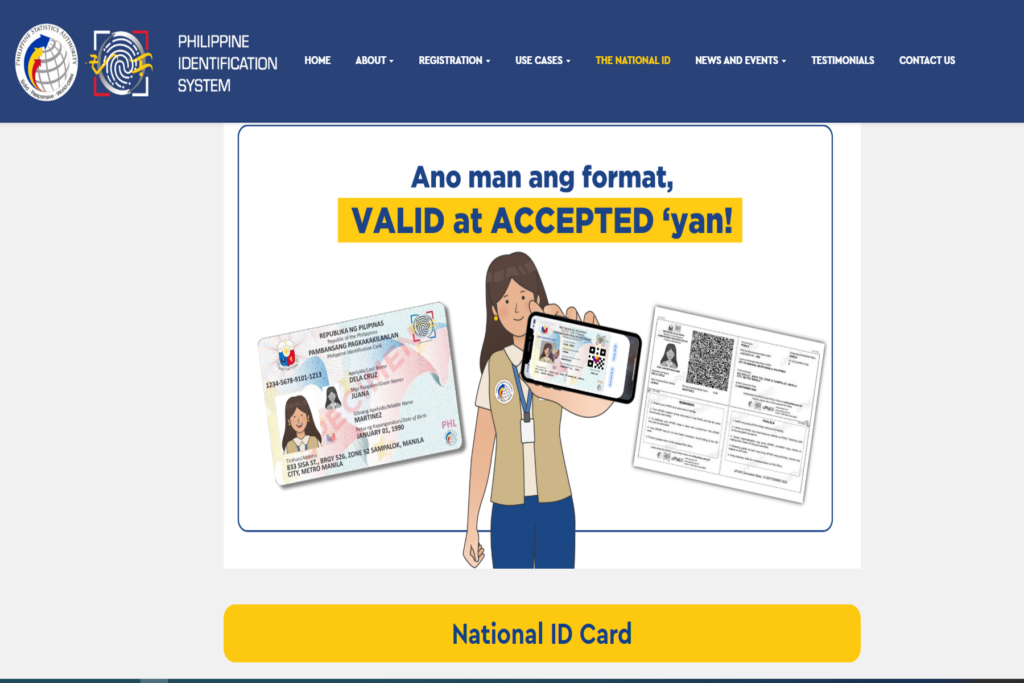
The Three Official Formats of the PhilSys National ID in 2026
The absolute biggest source of confusion for applicants today is the format of the ID itself. Because the Bangko Sentral ng Pilipinas (BSP) and the Philippine Statistics Authority (PSA) faced unprecedented logistical challenges in printing millions of polycarbonate smart cards, they legally diversified the formats.
Before you gather your documents, you need to understand that the PhilSys National ID exists in three valid, legally binding versions. You do not need to wait for the physical card to start using your identity.
1. The Physical PhilID (The PVC Smart Card)
This is the actual, physical polycarbonate smart card containing your demographic data, a front-facing photograph, and a highly secure QR code. This card is centrally printed by the BSP in Quezon City and delivered door-to-door by the Philippine Postal Corporation (PHLPost). Because of the massive millions in the printing queue, receiving this physical card can take anywhere from six months to over a year after your biometrics capture.
2. The ePhilID (The Printed Paper Version)
To combat the severe printing delays, the PSA introduced the ePhilID. This is a printed document on a standard piece of bond paper that you can claim at your local registration center shortly after your biometrics are taken. It contains the exact same information and the exact same scannable QR code as the physical card.
Crucial Fact You Must Know: Under BSP Memorandum No. M-2022-044, all major banks (BDO, BPI, Metrobank), remittance centers (Palawan Express, Cebuana), and government agencies are legally mandated to accept the folded ePhilID paper as a valid, primary proof of identity. They cannot reject it simply because it is made of paper. If a bank teller refuses your ePhilID, you have the absolute right to report them to the Bangko Sentral ng Pilipinas for immediate sanction.
3. The National ID Digital Version (via eGov PH App)
This is the ultimate 2026 standard. The Department of Information and Communications Technology (DICT) has directly integrated the PhilSys registry into the eGov PH Super App and the official web portal. Once you have completed your biometrics, you can undergo a quick facial recognition scan (a liveness check) using your phone’s camera and instantly generate your national id digital copy on your screen. This digital format is accepted nationwide and practically eliminates the need to carry physical cards in your wallet.
Eligibility: Who Exactly Can Apply for the PhilSys ID?
Unlike the SSS or Pag-IBIG which require you to be a working professional or at least 18 years old, the National ID Philippines is a foundational identification system designed for absolutely everyone residing in the country. Inclusivity is the main goal.
- Filipino Citizens: Regardless of age. Even newborn babies can be registered (their demographic data will simply be linked to their parent’s or guardian’s PhilSys Number). However, full biometrics (fingerprints and iris scans) are captured when the child reaches 5 years old, and they must update their biometrics again when they turn 15.
- Dual Citizens: Filipinos who hold dual citizenship are fully eligible to apply.
- Resident Aliens: Foreign nationals who have been legally living in the Philippines for more than six (6) consecutive months are eligible and highly encouraged to apply to make their banking and travel processes smoother.
Core National ID Requirements Philippines 2026: What to Bring
To ensure your registration is not rejected by the strict data evaluators, you must present authentic and original documents to prove your identity. The PSA uses a rigid hierarchy for accepted documents. You must gather these specific National ID Requirements Philippines before heading to a registration center.
Primary Documents (Bring the Original + 1 Clear Photocopy)
If you have any of the following documents, you only need to bring ONE (1) of them. This is the absolute fastest way to get your application approved with zero questions asked:
- An Original PSA-issued Birth Certificate AND one (1) valid government-issued identification document which bears your full name, a front-facing photograph, and your signature or thumbmark.
- Valid Philippine Passport or ePassport issued by the Department of Foreign Affairs (DFA).
- Valid GSIS or SSS-issued Unified Multi-Purpose Identification (UMID) Card.
- Valid Land Transportation Office (LTO) Student Permit or Non-Professional/Professional Driver’s License.
Secondary Documents (If Primary is Unavailable)
We understand that not everyone has a Passport or a Driver’s License. If you do not have primary IDs, you can present your Original PSA Birth Certificate alongside any of the following secondary IDs, provided they clearly display your photo and signature:
- PhilHealth ID (PVC or laminated cardboard format)
- TIN ID (Tax Identification Number Card)
- Postal ID
- Voter’s ID or COMELEC Certification
- NBI Clearance or Police Clearance
- Senior Citizen ID
- PWD ID
- Valid School ID (for students, must be signed by the principal)
Special Documents for Specific Cases
There are a few special scenarios where the evaluators will ask for supplementary paperwork:
- For Married Women: If you are legally using your husband’s surname, you MUST bring your Original PSA Marriage Certificate. Without it, the data encoder will be forced to print your ID using your maiden name exactly as it appears on your birth certificate.
- For Resident Aliens (Foreigners): You must present your valid foreign Passport AND your Alien Certificate of Registration (ACR I-Card) issued directly by the Philippine Bureau of Immigration.
How to Get National ID: The Step-by-Step Registration Guide
Applying for the Philippine National ID is completely free of charge. You do not need to pay a single peso. The government has drastically streamlined the workflow to make it as accessible as possible. Here is exactly how to get national id once you have completed your documentary requirements:
- Step 1: Locate a Registration Center. You have two options. You can pre-register your demographic data online via the PhilSys portal to save time, or simply walk into any PSA Fixed Registration Center. Today, these are highly accessible and are usually located inside major shopping malls (SM Supermalls, Robinsons, Ayala Malls) and local municipal city halls. Walk-ins are highly accommodated.
- Step 2: Document Verification. Present your prepared documents to the PSA evaluator stationed at the entrance. They will manually check your PSA Birth Certificate against your secondary IDs to ensure there are no spelling discrepancies in your name or birthdate.
- Step 3: Demographic Encoding. You will be asked to sit at a computer terminal. The officer will input your full name, blood type, permanent home address, marital status, and active contact details. Pro-Tip: Stare intently at the monitor while they type. If they misspell your street name or enter the wrong birth year, correct them immediately. Fixing a typo after the ID is already printed is a massive bureaucratic headache.
- Step 4: Biometrics Capture. This is the most crucial part. The officer will take your official front-facing photograph. (Remember to wear collared shirts; strictly avoid heavy makeup, colored contact lenses, and large earrings as they interfere with the facial recognition software). Next, your iris will be scanned using a specialized camera, followed by a digital scan of all 10 of your fingerprints.
- Step 5: Securing the Transaction Slip. Upon completion, the officer will hand you a Transaction Slip containing your unique 29-digit Transaction Reference Number (TRN). Keep this paper slip as safe as a passport. You will need this specific TRN to use the national id tracking system, claim your ePhilID, and activate your digital app. Do not throw it away!
National ID Tracking: How to Check Your Delivery Status
Once you step out of the registration center, the waiting game begins. Your biometric data is sent to the central servers to ensure you haven’t registered twice (de-duplication process), after which the BSP will queue your card for physical printing.
To monitor the whereabouts of your physical PVC card, you must use the official national id tracker. Simply go to the official PHLPost tracking website, input the 29-digit TRN found on your transaction slip, and hit search. If the tracker says “Not Found,” it simply means the card is still in the printing queue and hasn’t been turned over to the post office yet. Do not panic; this is normal.
How to Access Your National ID Online and Digital Copy
If your PHLPost tracking is taking too long, do not wait months for the physical card. Approximately two to four weeks after your biometrics capture, your data should be live on the servers, allowing you to generate your digital formats:
- To download the Digital ID (Via Website): Open your browser and visit national-id.gov.ph on your computer or smartphone. Enter your personal details (Name, Date of Birth). The site will require you to complete a facial verification (liveness check) via your webcam or phone camera. Once authenticated, you can view and download an official soft copy of your ID.
- To claim the Digital ID (Via eGovPH App): This is the most convenient method. Download the eGovPH App from the Google Play Store or Apple App Store. Sign up using your mobile number, verify your identity via a live selfie, and your national id digital file will permanently reside inside the app, ready to be presented anytime.
- To verify authenticity (eVerify System): If a bank teller, an airline ticketing agent, or a government officer doubts the legitimacy of your digital ID, instruct them to visit everify.gov.ph/check. They can scan the QR code on your phone’s screen using their own camera to instantly verify your digital signature in the national database.
Troubleshooting: Data Mismatch and Updating Information
What happens if your ID finally arrives, but you notice a glaring error? Perhaps your middle name is misspelled, your birth year is off by a single digit, or you recently got married and want to update your surname.
A National ID Philippines with incorrect demographic data is practically useless. Banks will instantly reject it when cross-referencing your YMYL (Your Money or Your Life) records, like your birth certificate. You cannot fix this issue via a simple phone call or an email.
According to the latest PSA advisories, you must undergo a formal Updating of Demographic Data process. You must return to a primary PSA Fixed Registration Center in person. Bring your incorrect National ID and present your Original PSA Birth Certificate (or Marriage Certificate) as absolute, undeniable proof of the correct spelling. You will be asked to fill out a Data Update Form (DUF) and repeat the biometric authentication. The PSA will then update your digital profile and issue a reprint request.
WARNING: Beware of Facebook National ID Printing Scams
Because many Filipinos strongly dislike carrying the folded ePhilID paper version in their wallets, a massive black market of “ID Fixers” has erupted on Facebook, TikTok, and local neighborhood print shops. These fixers offer a seemingly harmless service: you send them your ePhilID PDF file via Messenger, and they will print it onto a hard PVC plastic card for a fee of ₱150 to ₱300, making it look almost exactly like the official physical card.
Do not do this. This is highly illegal and incredibly dangerous to your financial security. The PSA strictly prohibits printing the Digital National ID on PVC or plastic.
First, sending your ePhilID PDF to a random stranger on Facebook exposes your full legal name, demographic data, and unique QR code to identity thieves. Syndicates can use your identity to secretly open fraudulent bank accounts, take out massive online loans in your name, or commit cybercrimes.
Second, altering the format of a government document without authorization is legally considered Falsification of Public Documents. When you try to present a fake, unauthorized PVC printout to a strict bank teller or a DFA passport officer, their highly calibrated scanners will immediately detect it. The government agency is authorized to confiscate the fake card, deny your transaction entirely, and you could potentially face criminal charges. Please, stick to the official paper ePhilID or the eGov PH Digital App until your real BSP-printed card arrives.
Frequently Asked Questions (FAQs)
1. Is the PhilSys National ID mandatory for all Filipinos?
While not strictly mandatory by law with a specific penalty for non-compliance, the PhilSys National ID is highly recommended and practically essential. It serves as the foundational, unified identification for all government and financial transactions in 2026. Without it, you will face massive hurdles trying to easily open bank accounts, apply for passports, or claim social welfare benefits.
2. Can I process my entire National ID online?
No, you cannot complete the entire process remotely. While you can track your delivery and access your national id online, you must still visit a physical PSA Registration Center in person. This is because the government needs to capture your physical biometrics—specifically your 10 fingerprints and your high-resolution iris scan—to ensure absolute identity security and prevent duplicate registrations.
3. My tracking status says “Not Found.” What does it mean?
If you enter your 29-digit TRN into the national id tracking portal and it returns a “Not Found” error, it simply means your physical card has not yet been printed or handed over to PHLPost for delivery. Instead of waiting blindly, try logging into the eGovPH app to see if your digital version is already available.
⚠ Important Notice and Disclaimer
RequirementPH is an independent, privately-run educational platform. Our core mission is to simplify complex government transactions, eradicate bureaucratic confusion, and protect the data privacy of every Filipino. We are NOT affiliated, associated, authorized, endorsed by, or in any way officially connected with the Philippine Statistics Authority (PSA), the Bangko Sentral ng Pilipinas (BSP), or any government entity.
While we research tirelessly to provide the most accurate, up-to-date guide on the National ID Requirements Philippines process, internal PSA protocols, eGov PH app updates, and PHLPost delivery timelines are subject to change based on official government circulars. For official ID tracking, data correction forms, or to report fraudulent fixers, please transact directly through the official PhilSys website or visit your nearest municipal registration center.
Your Next Steps & Related Guides
Securing your PhilSys National ID is the ultimate foundation of your professional and personal identity in the Philippines. Once you have this ID, securing every other government document becomes incredibly fast and easy. Make sure your entire government portfolio is completely secure by checking out our other highly detailed master guides: