
#1 Ultimate PhilHealth Online Registration Philippines 2026 (Step-by-Step Easy Guide for New Members)
Whether you are a fresh graduate celebrating your first corporate job offer, a freelancer securing an online client, or a parent preparing for an upcoming hospital delivery, there is one non-negotiable government requirement you must secure: your active PhilHealth membership. Under Republic Act No. 11223, also known as the Universal Health Care (UHC) Act, every Filipino citizen is automatically included in the National Health Insurance Program. However, being “included” by law does not mean you are actively registered in the system to receive benefits or process your payroll.
Without an active PhilHealth Identification Number (PIN) and a printed Member Data Record (MDR), your employer cannot legally process your monthly salary deductions. More importantly, if a medical emergency strikes, hospitals will not automatically deduct the massive PhilHealth subsidies from your final billing statement, leaving you drowning in out-of-pocket medical debt. Securing your PhilHealth Online Registration Philippines 2026 is your ultimate safety net.
For decades, securing this membership meant waking up at dawn, traveling to a crowded Local Health Insurance Office (LHIO), and spending an entire day falling in line. Today, the Philippine government has drastically modernized its infrastructure. However, this digital shift has created massive confusion. Many Filipinos do not understand the difference between getting a PIN online and securing the actual physical PVC ID Card.
If you fill out the wrong form or apply for a second PIN because you forgot your first one, your monthly contributions will float in the system uncredited. As your definitive authority on Philippine government transactions, RequirementPH has built this foolproof, comprehensive masterclass. We will break down the exact PhilHealth Online Registration Philippines 2026 process, guide you through the official portal step-by-step, explain how to claim your physical or digital ID, and teach you how to avoid the dangerous fake ID syndicates operating on social media.
The 2026 Reality: The PIN vs. The MDR vs. The PhilHealth ID
Before you begin navigating the government portals, we must immediately clarify the biggest misconception regarding the PhilHealth Online Registration Philippines 2026 process. Most new members conflate three entirely different documents. You must know exactly what you are applying for.
1. The PhilHealth Identification Number (PIN)
This is your unique, lifetime, 12-digit permanent account number. This number is what your HR department actually needs for your payroll, and what hospitals need to verify your coverage. You can generate this number entirely online through the registration portal without ever visiting a branch.
2. The Member Data Record (MDR)
The MDR is an official, printed paper document that acts as your comprehensive profile. It displays your PIN, your membership category, your chosen dependents (like your children or elderly parents), and your payment history. Hospitals value the MDR more than the ID card. Once your online registration is complete, you can download and print your MDR in PDF format directly from the portal.
3. The PhilHealth PVC ID Card
This is the physical, laminated card you carry in your wallet. Crucial Note: You generally cannot print this physical card online. Once you generate your PIN online, you must physically visit your designated LHIO or an SM Business Center to request the printing of the actual card, or generate the new Digital PhilHealth ID via the eGov PH app.
Mandatory vs. Voluntary: What is Your Membership Category?
The PhilHealth system categorizes members based on how they earn their income. If you select the wrong category during your PhilHealth Online Registration Philippines 2026 submission, your contribution rates will be completely mismatched. You must know your exact taxpayer type before filling out the digital PhilHealth Member Registration Form (PMRF).
- Formal Economy (Private & Gov Employees): If you are a fresh graduate hired by a corporation, you fall under this category. Your employer will automatically deduct your premium contributions from your monthly salary and pay the employer counterpart.
- Informal Economy (Freelancers & Self-Employed): If you are a Virtual Assistant, a graphic designer on Upwork, a doctor, or an entrepreneur registering a DTI business, you must register as a voluntary paying member. You are responsible for paying your own monthly or quarterly premiums.
- Overseas Filipinos (OFWs): Mandatory for all land-based and sea-based overseas workers. Registration and payment are usually integrated into the DMW/POEA OEC processing.
- Sponsored & Indigent Members: Individuals whose premiums are paid by local government units (LGUs) or the Department of Social Welfare and Development (DSWD).
Core Requirements for PhilHealth Online Registration Philippines 2026
Before accessing the PhilHealth portal, you must prepare the following digital requirements. Ensure these are scanned clearly or photographed in high resolution, as blurry uploads will result in automatic rejection by the portal administrators.
- Valid Government ID: A scanned copy of any primary ID showing your exact name, birthdate, and signature. Acceptable IDs include the PhilSys National ID, Philippine Passport, or Driver’s License. Check our comprehensive guide on Valid Government IDs if you need a primary ID.
- PSA Birth Certificate: A clear, scanned copy of your PSA Birth Certificate to definitively prove your citizenship, exact name spelling, and age.
- 1×1 ID Picture: A recent digital 1×1 photo with a white background.
- Active Email Address & Mobile Number: Must be highly secure, working contact details for OTP verification and account recovery.
Step-by-Step Guide: PhilHealth Online Registration Philippines 2026
The PhilHealth Electronic Registration System has been heavily upgraded to handle massive web traffic. Follow this exact sequence carefully to successfully complete your PhilHealth Online Registration Philippines 2026 process.
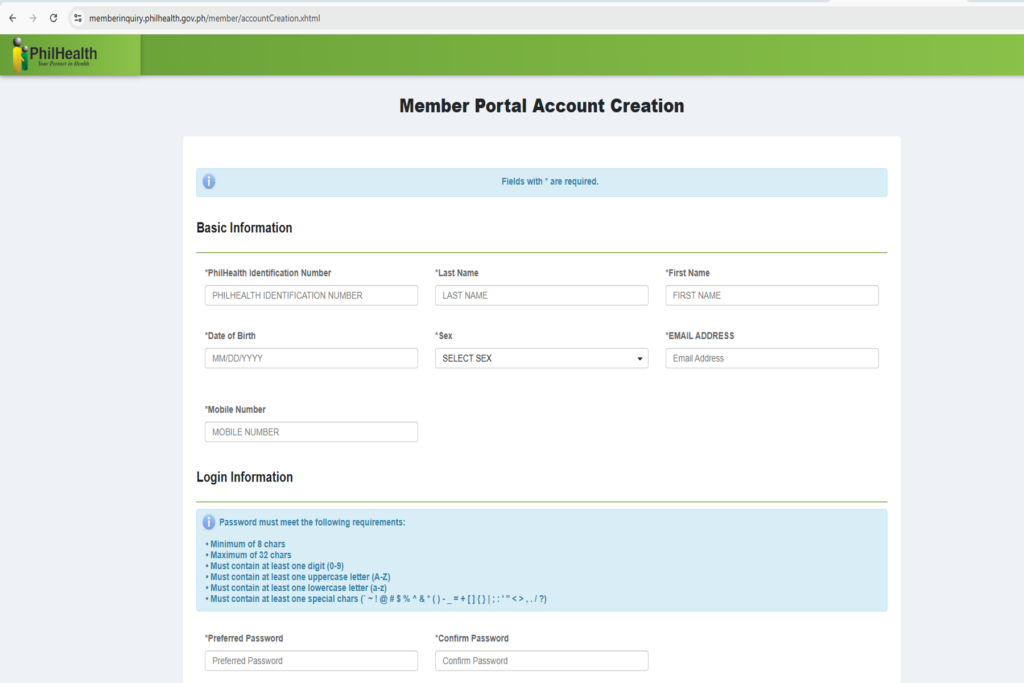
- Access the Official Portal: Open your secure browser and go to the official PhilHealth Member Portal. Click on the “Register / Login” button under the Online Services section.
- Create an Account: Click “Create Account” if you are a first-time member. The system will prompt you to agree to the Data Privacy Act terms.
- Fill Out the Digital PMRF: You will be presented with the digital equivalent of the PhilHealth Member Registration Form (PMRF). Enter your basic demographic data: Full Name, Date of Birth, Gender, Civil Status, and precise residential address.
- Select Membership Category: Choose correctly between Formal Economy, Informal Economy, or OFW based on the definitions we provided above.
- Declare Your Dependents: This is a crucial step. You can legally declare your non-working spouse, children under 21 years old, and parents who are 60 years old and above as your dependents. They will receive PhilHealth benefits without paying separate premiums, provided they are listed in your MDR.
- Upload Documentary Requirements: Upload your scanned PSA Birth Certificate, Valid ID, and 1×1 photo in JPEG or PDF format.
- Submit and Wait: Review all entries meticulously. Click “Submit.” The PhilHealth backend team will evaluate your uploaded documents. Within 3 to 5 working days, you will receive an email confirmation containing your permanent 12-digit PhilHealth Identification Number (PIN).
The eGov PH Super App Integration (The 2026 Digital Update)
In a massive leap forward for e-governance, you no longer necessarily need the physical PVC card to prove your membership in 2026. The Department of Information and Communications Technology (DICT) has integrated PhilHealth into the eGov PH Super App.
Once you successfully receive your PIN from the online registration, you can download the eGov PH app on your smartphone, verify your identity using the PhilSys National ID, and instantly generate a Digital PhilHealth ID. This digital ID features a highly secure, verifiable QR code that is legally mandated to be accepted by all accredited hospitals, clinics, and HR departments nationwide, eliminating the need to wait in line for the printed PVC card.
Troubleshooting: “Record Already Exists” & Forgotten PINs
One of the most dangerous mistakes applicants make during the PhilHealth Online Registration Philippines 2026 process is applying for a second PIN because they forgot their first one.
If you try to register and the system flashes a red warning stating “Record Already Exists,” you must stop immediately.
This means that years ago—perhaps during a college summer job, or when your parents declared you as a dependent—your name and birthdate were already encoded into the master database. By law, a Filipino citizen is allowed only one (1) PhilHealth PIN for their entire lifetime. If you bypass the system and possess two active PINs, your future premium payments will be split, and your hospital claims will be instantly denied due to conflicting records.
How to recover a forgotten PhilHealth PIN:
Do not register a new one. Simply email PhilHealth Action Center at actioncenter@philhealth.gov.ph with a clear photo of your Valid ID and PSA Birth Certificate, requesting a PIN retrieval. Alternatively, you can visit the nearest LHIO express counter to retrieve your existing PIN in minutes.
WARNING: The Massive Facebook Fake ID Scam
As the ultimate authority on government compliance, we must issue a severe warning regarding a highly organized syndicate preying on freelancers, students, and busy professionals.
Because some individuals struggle with the online portal or want the physical PVC card immediately without visiting a branch, a massive black market of “Online Fixers” operates on Facebook groups and TikTok. You will see posts boasting: “Rush PhilHealth ID Assistance! Legit PVC Card delivered to your door. No appearance needed. Just send your details and ₱500.”
This is a highly illegal and devastating trap. Do not engage with them.
As established, the PhilHealth Online Registration Philippines 2026 process is completely free. The generation of the digital ID is free. The printing of the PVC card at the branch is free. What these fixers actually do is take your money, use a stolen digital template in Photoshop, invent a random 12-digit number, and print a completely counterfeit ID card.
When you submit that fake PhilHealth ID to an employer, or worse, present it to a hospital billing department during a medical emergency, the clerk will verify the number against the database. When they discover the number is completely fake, your medical deductions will be denied, leaving you with a massive hospital bill. Furthermore, your HR department is legally obligated to terminate your employment and criminally charge you with Falsification of Public Documents. Never risk your professional future or your family’s health coverage for convenience. Always process your application legally.
⚠ Important Notice and Disclaimer
RequirementPH is an independent, privately-run educational platform. Our core mission is to simplify complex government transactions, eradicate bureaucratic confusion, and protect the medical and professional identity of every Filipino navigating the PhilHealth Online Registration Philippines 2026 process. We are NOT affiliated, associated, authorized, endorsed by, or in any way officially connected with the Philippine Health Insurance Corporation (PhilHealth) or any specific government entity.
While we research tirelessly to provide the most accurate, up-to-date guide on government requirements, specific portal system updates, premium contribution rate increases, and digital ID implementations are subject to change based on official PhilHealth circulars. To read the exact legal texts regarding mandatory health coverage, you may consult the Universal Health Care Act at the Official Gazette. For official account recovery, PIN verification, or to file a formal medical claim, please transact directly through the official PhilHealth website or visit a Local Health Insurance Office.
Your Next Steps & Related Master Guides
Securing your PhilHealth PIN and MDR is a critical milestone, but it is just one part of the “Big 4” mandatory government contributions required for employment in the Philippines. To ensure your entire documentary portfolio is bulletproof and ready for your HR department, check out our other highly detailed master guides:
Magandang umaga po nais ko lang po na malaman kung paano mag apply ng trabahong nakalista dito? maraming salamat po.”
Salamat po sa inyong komento ngunit pasensya na po wala pong mga trabaho ang mahahanap dito mga requirements guide lang po sa government agencies ang mababasa nyo dito
Paano po kung hindi lumalabas sa egov ang digital philhealth id? Nawala po kasi ang physical id ko
Kung hindi po lumalabas ang Digital PhilHealth ID sa eGovPH kahit verified na ang account, subukan po munang buksan ang eGovPH → PhilHealth → PhilHealth Member Portal at i-login/i-confirm ang pag-share ng personal information. Minsan kailangan munang ma-sync ang records sa PhilHealth system bago lumabas ang Digital ID.
Kung hindi pa rin lumabas, posible ring may hindi tugmang personal information sa PhilHealth at eGovPH records. Maaari pong makipag-ugnayan sa PhilHealth para ma-check ang record.
Kung nawala naman po ang physical PhilHealth ID, hindi ibig sabihin na wala na ang PhilHealth membership ninyo—ang mahalaga ay ma-verify ang PhilHealth record/PIN ninyo.